


Highway Radar
4.2159.00 Reviews
App Specs
- Version
- 3.2 (update 7)
- Updated On
- License
- Free
- Downloads
- 100,000+
- Developer
- Highway Radar
- Categories
- Auto & Vehicles
- Platform
- Android
Screenshots
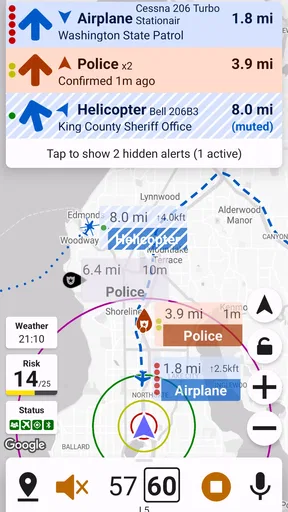
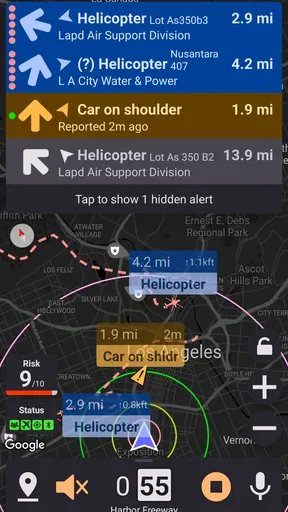
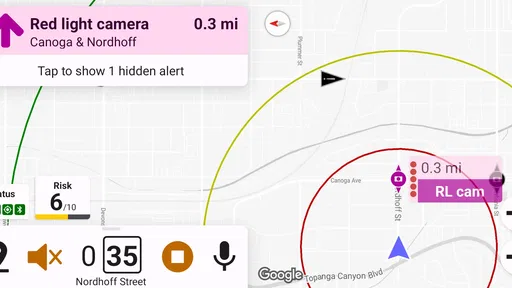
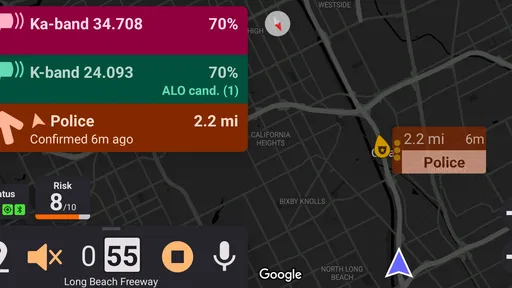
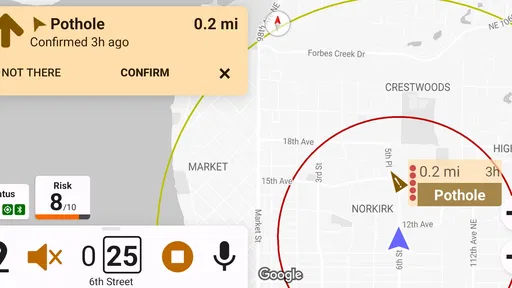
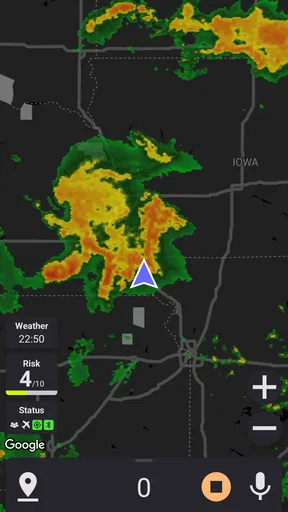
 Analysis by AppCompare
I came away from Highway Radar with a fairly clear impression: it is most useful as an extra set of eyes during a long drive, not as a replacement for sensible driving or a complete navigation service. The app sits in the Auto & Vehicles category and focuses on giving drivers earlier awareness of possible speed traps and road hazards. That sounds simple, but the value becomes clearer when traffic, unfamiliar roads, and changing speed limits make it difficult to notice everything in time.
What I like most is the app’s practical purpose. It is not trying to turn a journey into a game or bury the driver in unrelated travel features. Its job is to help me pay attention to potential trouble ahead, while I remain responsible for reading signs, judging traffic, and choosing a safe speed. That narrow focus makes it appealing for highway trips, especially when I want an additional warning layer beside my normal navigation app.
How Highway Radar fits into a real drive
Highway Radar is a free app from Highway Radar, and its public reception is encouraging without being so large that I would treat it as universally proven. It holds a 4.2 average from around 443 ratings, with roughly 159 written reviews, and has passed 100K installs. Those figures suggest a real user base and a generally positive response, while also reminding me that local coverage and personal driving habits will matter more than the headline rating.
The most sensible way to use it is alongside ordinary navigation. I would set my route in the navigation tool I already trust, then use Highway Radar as a focused awareness aid. The navigation app remains better suited to directions, arrival planning, and route changes. Highway Radar has a different role: it can help draw attention to a possible speed-control area or hazard before I reach it.
That distinction is important because a warning is not an instruction. A driver should never brake sharply simply because an alert appears, and should not assume that a clear screen means the road is clear. I found the app more useful when I treated each notice as a prompt to check the road, signs, mirrors, and traffic flow—not as permission to relax.
A realistic example would be a weekend drive on an unfamiliar highway. I might be following a route through several towns, dealing with changing limits, merging lanes, and a passenger giving directions. In that situation, an early indication of a possible speed trap or road problem can make me more deliberate. I can ease into a legal speed, increase my following distance, and look for lane changes before the situation becomes urgent. The benefit is not simply avoiding a ticket; it is reducing surprise.
Why the focused approach works
Many conventional navigation apps try to do everything at once: directions, traffic coloring, businesses, fuel stops, messages, and route recommendations. That breadth is useful, but it can also make safety-related information compete with other visual and audio demands. Highway Radar’s narrower purpose gives it a clearer identity. When I open it, I am thinking about awareness on the road rather than searching for a restaurant or comparing alternate routes.
Worth Reading Before You Choose

EA SPORTS FC Mobile 26 Is a Bigger Football Game, but It Takes Time

Flipboard Shows What News Apps Must Do Beyond the Feed

Switching to Android Auto Means Rethinking Your Driving Routine

Google Calendar Makes a Crowded Week Easier to Manage

Ludo King Makes the Most of the Minutes Between Plans

Baby Panda World Brings Quick Play to Modern Phones, but Its Game Library Feels Busy
That focus is especially helpful for drivers who already have a preferred navigation app. I do not need to abandon familiar maps or relearn route planning simply to gain a second source of road awareness. The trade-off is that I have to manage two tools instead of one, so the setup is not as effortless as using a single all-purpose application.
Another useful insight is that the app should be prepared before the vehicle is moving. I would review the route, phone position, sound level, and any relevant settings while parked. Doing this in advance avoids the common mistake of trying to interpret a new alert system while changing lanes or approaching an interchange. The app can support attention, but only if it does not become another distraction.
I also think it works best for drivers who prefer earlier, calmer decisions. Someone who waits until the last moment to react will not get the full benefit from any warning tool. The practical advantage comes from having a little more time to verify what is happening and respond smoothly. That makes the app more valuable on long, tiring drives than during a short trip where I already know every turn and speed change.
What I would pay attention to during setup
Before relying on Highway Radar, I would spend a few minutes learning how its warnings appear and sound. A driver needs to know whether an alert is easy to recognize without staring at the screen, whether notifications are too frequent for a particular route, and how the app behaves beside the chosen navigation tool. Those details affect usability more than a store summary can show.
I would also test the arrangement while parked. The phone should be mounted where it does not block the view, and the driver should not need to reach across the dashboard to dismiss or inspect something. If the app’s alerts encourage repeated glances, the setup is working against its purpose. In my view, the best configuration is the one that lets me keep my eyes on traffic and use the screen only for occasional confirmation.
There is a subtle trade-off between more information and better concentration. A driver may initially want every possible notice, but a busy route can produce enough activity to make the experience tiring. I would adjust my use based on the road: a long, open highway may tolerate more awareness information, while dense city traffic demands simplicity. Highway Radar is more useful when it supports a driving plan rather than becoming the plan.
The strongest evidence of value
The strongest case for this app is its usefulness in situations where uncertainty is the real problem. On a familiar commute, I already know many of the difficult points. On an unfamiliar highway, I may not know where enforcement commonly occurs, where lanes narrow, or where a hazard could interrupt the normal flow. An additional warning can help me shift from reacting late to observing earlier.
It can also encourage better habits. If I know that a possible speed-control area may be ahead, I am more likely to check the actual posted limit instead of relying on memory. If a hazard notice appears, I may leave more room between vehicles and scan farther down the road. In that sense, the app’s value is partly behavioral: it can remind me to drive attentively, provided I do not become dependent on it.
The app’s free price lowers the barrier to trying it. I can evaluate whether it suits my routes without committing money first. That matters because warning quality is highly personal. A tool that feels useful on one driver’s regular highways may feel unnecessary or noisy on another’s daily roads. Free access makes that trial practical.
Its Everyone content rating also makes it broadly approachable for ordinary drivers and families. That does not change the need for mature use behind the wheel, but it means the app is not positioned as a specialist tool for a narrow professional audience. I can imagine it being useful for occasional road trippers, commuters who cross unfamiliar areas, and drivers who want focused awareness without replacing their existing maps.
There is also a sensible division of labor between Highway Radar and a vehicle’s built-in systems. A car’s dashboard may show some information, but it may not provide the same focused awareness layer. Conversely, a phone app should not be treated as a substitute for the vehicle’s own safety features or the driver’s direct observation. Used together, these tools can complement one another; used carelessly, they can create too much confidence.
The meaningful weakness: warnings are never the whole road
The main limitation is inherent to this kind of app. A warning system can only help with information that reaches it and can be presented in time. Road conditions change quickly, and not every hazard will be represented exactly when I need it. I should expect occasional uncertainty, outdated context, or an alert that requires interpretation. That does not make the app pointless, but it prevents me from treating it as an authority.
False confidence is the more serious risk. If I begin to think that no warning means no danger, I am using the app incorrectly. A clear screen cannot replace checking the speed limit, watching for construction, noticing stopped traffic, or adapting to weather. The app is strongest as a reminder to look more carefully, not as a guarantee that the route has been fully surveyed.
There can also be friction when combining it with another navigation application. Two apps may compete for attention, audio output, or screen space. Even if the technical arrangement works well, the mental workload can rise. I would skip Highway Radar if I found myself constantly switching between screens, adjusting notifications, or wondering which instruction to follow. A simpler setup is better than a feature-rich one that distracts me.
Drivers who mainly travel short, familiar urban routes may not gain enough to justify that extra layer. City streets already demand frequent attention to pedestrians, cyclists, intersections, buses, and sudden lane changes. In that environment, a specialized warning app may add more information than value. I would choose it for longer or less familiar drives rather than automatically running it every time I start the car.
It is also not the right choice for someone looking for a complete navigation replacement. The app’s identity is centered on speed traps and road hazards, not on replacing every function of a dedicated map service. If my priority is turn-by-turn guidance, live route planning, business search, or a broad travel toolkit, I would choose a conventional navigation app first and consider Highway Radar only as a companion.
Who will get the most from it
I think the best audience is a driver who takes regular highway trips and wants a focused awareness aid beside an established navigation routine. That includes people driving through unfamiliar regions, commuters whose routes pass through changing speed zones, and travelers who prefer to prepare for possible interruptions rather than react to them. The free price makes it easy to test without turning the decision into a major purchase.
It may also suit cautious drivers who appreciate prompts to verify their speed and surroundings. The app does not need to transform the driving experience to be useful. A small amount of advance awareness can be enough to make a lane change smoother or prevent a rushed response. The key is that the driver must already be willing to follow signs and make independent judgments.
I would be more hesitant to recommend it to someone who wants a single app to handle every driving need. I would also advise against it for a driver who is easily distracted by notifications or who tends to interact with a phone while moving. In those cases, the extra information may create more risk than benefit. A passenger can help with interpretation, but the driver should not rely on passenger assistance as a requirement for safe use.
Families may appreciate the broad Everyone rating, but I would still establish a simple rule: configure the app before departure and avoid experimenting during the journey. For a new user, the first drive should be a low-pressure trip where the behavior of alerts can be learned safely. A long, unfamiliar night drive is a poor time to discover that the sound level, display, or notification style needs adjustment.
Version, compatibility, and the everyday ownership experience
The current release is version 3.2, update 7, and the app supports Android 7.0 and later. That gives it a reasonably broad reach for people using older Android phones, although practical performance will still depend on the handset, its battery condition, and how many other apps are active. I would check the phone’s stability before a long trip rather than assuming that compatibility alone guarantees a smooth experience.
Battery planning is worth taking seriously with any phone-based driving aid. Navigation, screen use, location services, and audio can all place demands on a device. I would begin a long trip with a good charge and use reliable in-car power when available. This is not a criticism unique to Highway Radar; it is part of the trade-off of adding a smartphone to the driving setup.
I would also keep the app and the phone’s operating system in a stable state before traveling. Updating immediately before departure can introduce uncertainty, while never updating can leave the experience behind. My preferred routine would be to test the app on a normal drive after an update, then use it for a major journey only once I know the alerts and navigation arrangement behave as expected.
The developer name, Highway Radar, makes the app’s purpose easy to understand, and the product has been available since June 2, 2019. Its continued presence alongside the current release gives it more history than a brand-new experiment, but I would still judge it by how well it fits my roads and habits. A long presence does not remove the need for local testing.
My practical routine for using it
My recommended workflow is deliberately simple. First, I would plan the route in the navigation tool I normally use. Next, while parked, I would open Highway Radar, position the phone securely, and confirm that alerts can be noticed without repeated screen checks. I would then start driving with a clear rule: every alert is a reason to observe, not a reason to panic or make an abrupt maneuver.
On the road, I would keep my attention on the far field of traffic and the actual signs. If a possible speed trap is indicated, I would verify the posted limit and settle into a legal, comfortable speed. If a hazard is indicated, I would increase my scanning distance and leave room to respond. This approach turns the app into a decision-time buffer rather than a source of commands.
After a few trips, I would decide whether the alerts genuinely improve my awareness. If they help me prepare without distracting me, I would keep the app in my travel routine. If I find myself checking the phone too often or second-guessing normal road conditions, I would remove it from that setup. The right question is not whether the app can produce warnings; it is whether those warnings make me a calmer and more attentive driver.
Compared with relying only on roadside signs, Highway Radar can provide an additional early cue, which is useful when attention is divided by an unfamiliar route. Compared with a standard navigation app, it offers a more specialized focus. Compared with dedicated in-car equipment, it is easier to try and does not require a separate purchase, but it also inherits the limitations of a phone: screen placement, battery needs, and the temptation to interact with it.
That comparison explains why I would not call it essential for everyone. A driver with excellent built-in navigation, familiar roads, and a strong habit of checking signs may find the extra layer unnecessary. A driver who frequently crosses unfamiliar highways may see more value. The app’s success depends less on replacing something and more on whether it fills a specific awareness gap.
Final verdict
Highway Radar is a focused, sensible companion for drivers who want earlier awareness of possible speed traps and road hazards. I like its narrow purpose, free entry point, and compatibility with an existing navigation routine. Its best contribution is not dramatic automation; it is the chance to notice a situation sooner and respond with less haste.
My recommendation comes with a firm condition: use it as supporting information, never as a substitute for signs, traffic judgment, or safe driving. The meaningful weaknesses are the possibility of incomplete or distracting warnings and the extra complexity of running it beside another navigation tool. Those limitations matter, especially for short city trips or anyone easily pulled toward a phone screen.
For long highway journeys and unfamiliar routes, I would try Highway Radar because the free price makes the experiment low-risk and the purpose is immediately practical. I would keep it only if it improves my awareness without demanding attention. For drivers who want a complete map, route planner, or one-screen travel assistant, a conventional navigation app remains the better primary choice. For the right audience, though, this app earns its place as a quiet second layer of road awareness.
Pros
- Detects police
- speed cameras
- and hazards along your route.
- Real-time alerts can help drivers stay more aware of road conditions.
- Supports background operation while using another navigation app.
- Offers detailed information about reported incidents and radar locations.
- Useful trip history and route tools for frequent highway drivers.
Cons
- Some features require a paid subscription or in-app purchase.
- Accuracy depends heavily on GPS reception and community reports.
- Frequent alerts may become distracting during busy drives.
- Battery usage can increase when tracking location continuously.
- Coverage and report quality vary considerably by region.
FAQs for Highway Radar
What is Highway Radar, and what does it do?
Highway Radar is a driving-assistance app designed to help motorists stay aware of possible hazards on the road. Depending on the device and available features, it can use your phone’s camera, GPS, and audio alerts to identify or report situations such as speed cameras, traffic enforcement areas, stopped vehicles, and other warnings. It is intended as an awareness tool, not a replacement for careful driving or local traffic knowledge.
Does Highway Radar work without an internet connection?
Highway Radar may provide some functionality through downloaded or cached information, but its performance can depend on an active internet connection. Online access is generally useful for receiving updated reports, map data, traffic information, and community-generated warnings. Before driving into an area with poor coverage, it is worth checking which features remain available offline and downloading any supported data in advance.
Does Highway Radar record my driving or use my phone’s camera?
Some Highway Radar features may require access to location services, motion sensors, or the camera, particularly when the app is used for dashcam-style monitoring or visual hazard detection. Permissions should be reviewed carefully during setup, and users can normally manage them through Android or iOS privacy settings. Check the app’s current privacy policy to understand how recordings, location data, and reports are handled.
Can Highway Radar detect every police checkpoint, speed camera, or road hazard?
No driving-alert application can guarantee complete or perfectly accurate detection. Highway Radar may rely on GPS databases, user reports, sensor data, or camera-based recognition, and these sources can contain outdated, incomplete, or incorrect information. Alerts can also be affected by weather, road layout, device placement, GPS accuracy, and regional support. Always follow posted signs and obey the applicable speed limits.
Is Highway Radar legal and safe to use while driving?
The app can be useful when configured before starting a journey, but laws concerning radar detectors, speed-camera alerts, recording devices, and phone use vary by country, state, and region. Drivers should verify local regulations before relying on its alerts. For safety, mount the phone securely, keep interactions to a minimum, and never type, browse, or adjust settings while the vehicle is moving. The driver remains responsible for safe and lawful operation.


